Introduction: the phone is still one of the most important tools in a small business
Small business owners live in the real world. Customers call when they are ready to buy, when something is urgent, when they need directions, when a job is running late, when a quote needs to be approved, or when a problem needs to be fixed. A missed call can mean a missed job. A confusing voicemail can mean a frustrated customer. A phone number that only works in one location can slow down an owner who is already moving between jobs, suppliers, employees, and clients.
That is why Voice over Internet Protocol, usually called VoIP, matters so much for the small businessperson. VoIP is not just a technical idea for large call centers. It is a practical tool for tradespeople, contractors, consultants, medical offices, small retailers, repair companies, home service businesses, real estate professionals, accountants, logistics teams, and anyone who depends on being reachable.
In simple terms, VoIP lets you make and receive phone calls using an internet connection instead of being locked to an old-style phone line. The important part is not the technology by itself. The important part is what it lets a business do.
For a small business, this can feel like getting the phone system of a much larger company without needing a large-company budget or a full IT department. You do not need to understand every piece of telecom language. You only need to understand the business result: customers can reach you more easily, your team can answer from more places, your phone costs become easier to predict, and your company sounds more organized.
What is VoIP?
VoIP means Voice over Internet Protocol. In everyday language, that means your voice is turned into digital information, carried across an internet connection, and then delivered to the person you are calling.
That may sound technical, but the experience can be very familiar. You can still dial a normal phone number. Customers can still call your business number. Your phone can still ring. You can still answer with, “Good morning, how can I help you?” The difference is that the system behind the call is more flexible.
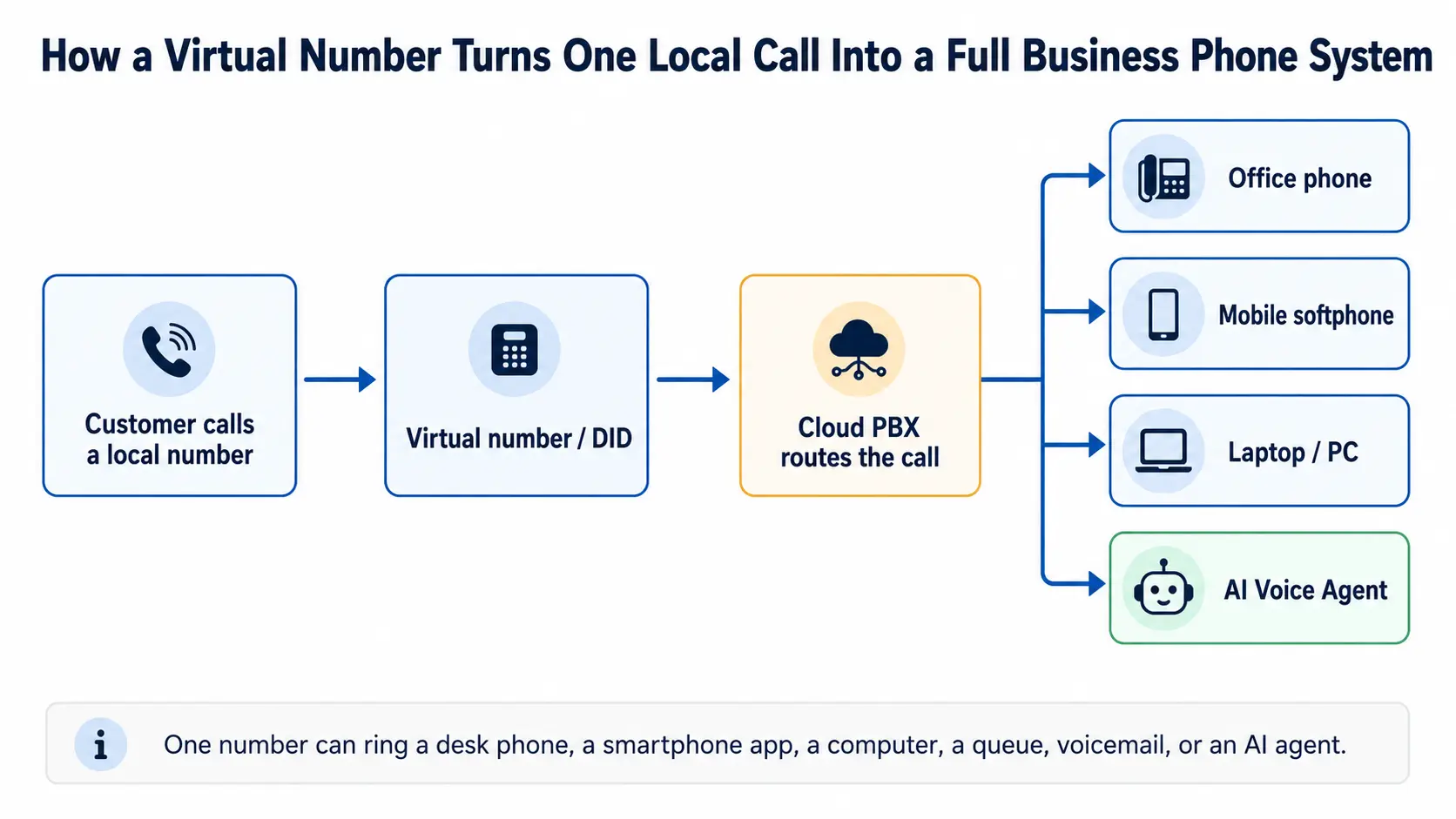
With an old phone line, the phone number is usually tied to a physical line, a physical office, or a single carrier arrangement. With VoIP, the phone number can be connected to a cloud phone system. That cloud system can send the call to a desk phone, smartphone app, laptop, voicemail box, call queue, ring group, or AI Voice Agent.
Think of old phone service as a fixed pipe running into one building. Think of VoIP as a smart delivery system. The number receives the call, and then your rules decide where the call should go.
For a small businessperson, this matters because business does not always happen at a desk. A plumber may be in a van. A contractor may be on a job site. A bookkeeper may be working from home. A clinic receptionist may be at the front desk during the day, but calls may still come in after hours. VoIP allows the phone system to follow the way the business actually works.
Why small businesses are moving away from old phone lines
Traditional phone lines are familiar, but they can be limiting. They often require physical installation, separate lines for different users, separate costs for features, and more work when a business moves or grows. If the owner wants to answer calls from a mobile phone, add another person, forward calls after hours, or open a number in another city, the process can become awkward.
VoIP is attractive because it is built around flexibility. A business can start with one number and one user. Later, it can add users, departments, devices, call routing, voicemail-to-email, and AI support. The same basic system can serve a one-person company, a five-person office, or a growing team with multiple locations.
Cost is another reason. Many small businesses are tired of surprise phone bills. Long-distance calling, international calling, extra lines, forwarding, and per-minute inbound fees can make costs hard to understand. A flat-rate inbound virtual number can make monthly costs easier to predict. Low-cost outbound calling can also reduce the cost of staying in touch with customers and suppliers.
Understanding virtual numbers
A virtual number is a real phone number that is hosted in the cloud instead of being tied to one physical phone line. It is also often called a DID, which means Direct Inward Dialing number. Customers dial it the same way they dial any other number. To them, it looks like a normal local, national, mobile, or toll-free number. Behind the scenes, the number can route calls through a VoIP system.
Virtual numbers are useful because they let a business create local presence without opening a physical office in every location. A Toronto contractor serving customers in nearby cities might want local numbers for different service areas. A consultant in Canada might want a U.S. number for American clients. A company selling internationally might want numbers in the United Kingdom, France, Germany, or Spain so customers can call a familiar type of number.
A virtual number can also protect a business from being too dependent on one mobile phone. Many small business owners start by putting their personal cell number on business cards, signs, ads, websites, and invoices. It works at first, but later it becomes messy. Calls arrive at all hours. Employees cannot help answer. If the owner changes mobile providers, travels, or loses the phone, the business number becomes fragile.
A virtual number gives the business more control. The number can ring the owner, ring an assistant, ring multiple people, go to a queue, go to voicemail, or go to an AI Voice Agent after hours. The phone number becomes a business asset instead of just a personal phone number.
Local number portability: keep the number customers already know
Local number portability is the ability to move an eligible existing phone number from one provider to another. This is important because many businesses have spent years building trust around one number. The number may be printed on trucks, uniforms, signs, magnets, brochures, Google Business Profile listings, websites, invoices, and customer contact lists. Losing it can create confusion and lost business.
Porting a number into a VoIP system can let the business keep the number while gaining modern features. Customers call the same number, but the business can answer on modern devices and use modern call routing.
Porting does require care. The business should avoid canceling the old phone service before the number has been successfully transferred. The name, address, account number, and authorization details usually need to match the current provider’s records. Timelines vary by country, provider, and number type. But when done properly, number portability can be one of the most valuable steps in upgrading a business phone system.
Making and receiving calls from an office, mobile phone, or computer
One of the easiest ways to understand VoIP is to stop thinking of the phone number as being attached to one device. In a VoIP system, the business number can be used by many kinds of devices.
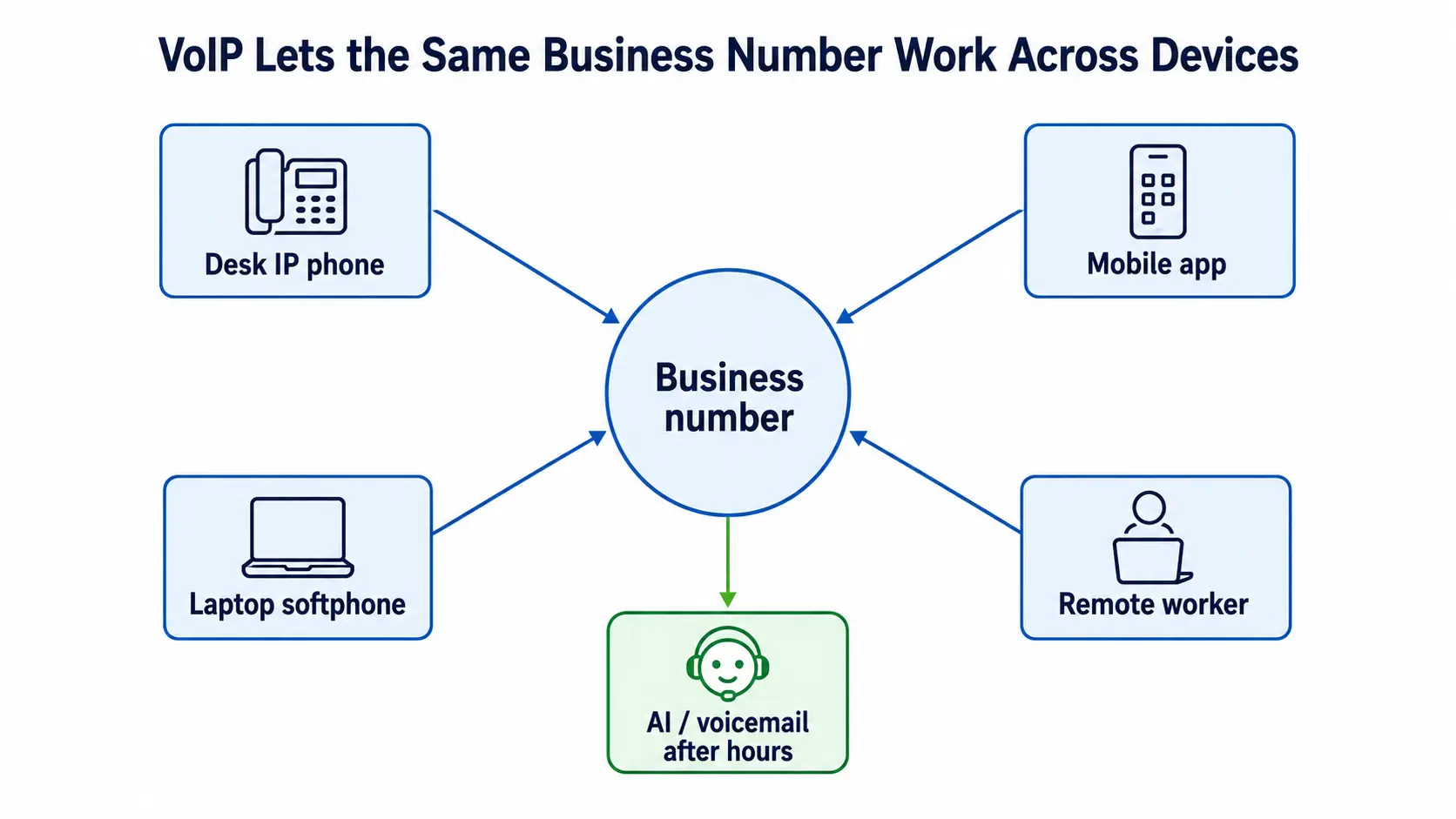
In an office, the business may use IP desk phones. These look and feel like traditional office phones, with buttons, handsets, speakerphone, and sometimes programmable keys. They connect to the network and register to the VoIP service.
On a mobile phone, the business can use a softphone app. This lets the user make and receive business calls through the app instead of exposing a personal mobile number. A contractor can answer the office number from a job site. A sales representative can call a customer from the road. A manager can make a business call from a smartphone while still presenting the company caller ID, where supported and properly configured.
On a laptop or desktop computer, a softphone can work through a headset. This is useful for office staff, remote workers, support teams, appointment setters, and anyone who spends much of the day in front of a screen. It can also be useful when staff need to look up customer records while speaking.
Hard phones and softphones: what is the difference?
A hard phone is a physical phone. It sits on a desk or counter and usually looks like a normal business phone. It may have a handset, speakerphone, display screen, speed dial buttons, and line keys. Hard phones are good for reception desks, offices, warehouses, clinics, shops, and any place where a shared physical phone is useful.
A softphone is software. It can run on a smartphone, tablet, laptop, or desktop computer. It may look like a dial pad on a screen. It uses the device’s microphone, speaker, headset, or Bluetooth device. Softphones are good for mobile workers, remote staff, owners who travel, and small teams that do not want to buy much hardware.
Both can work together. A front desk may use a hard phone. The owner may use a mobile softphone. A remote employee may use a computer softphone. A warehouse supervisor may use a rugged mobile device. The customer does not need to know which device answered the call. The customer simply called the business.
Call architecture: the simple building blocks
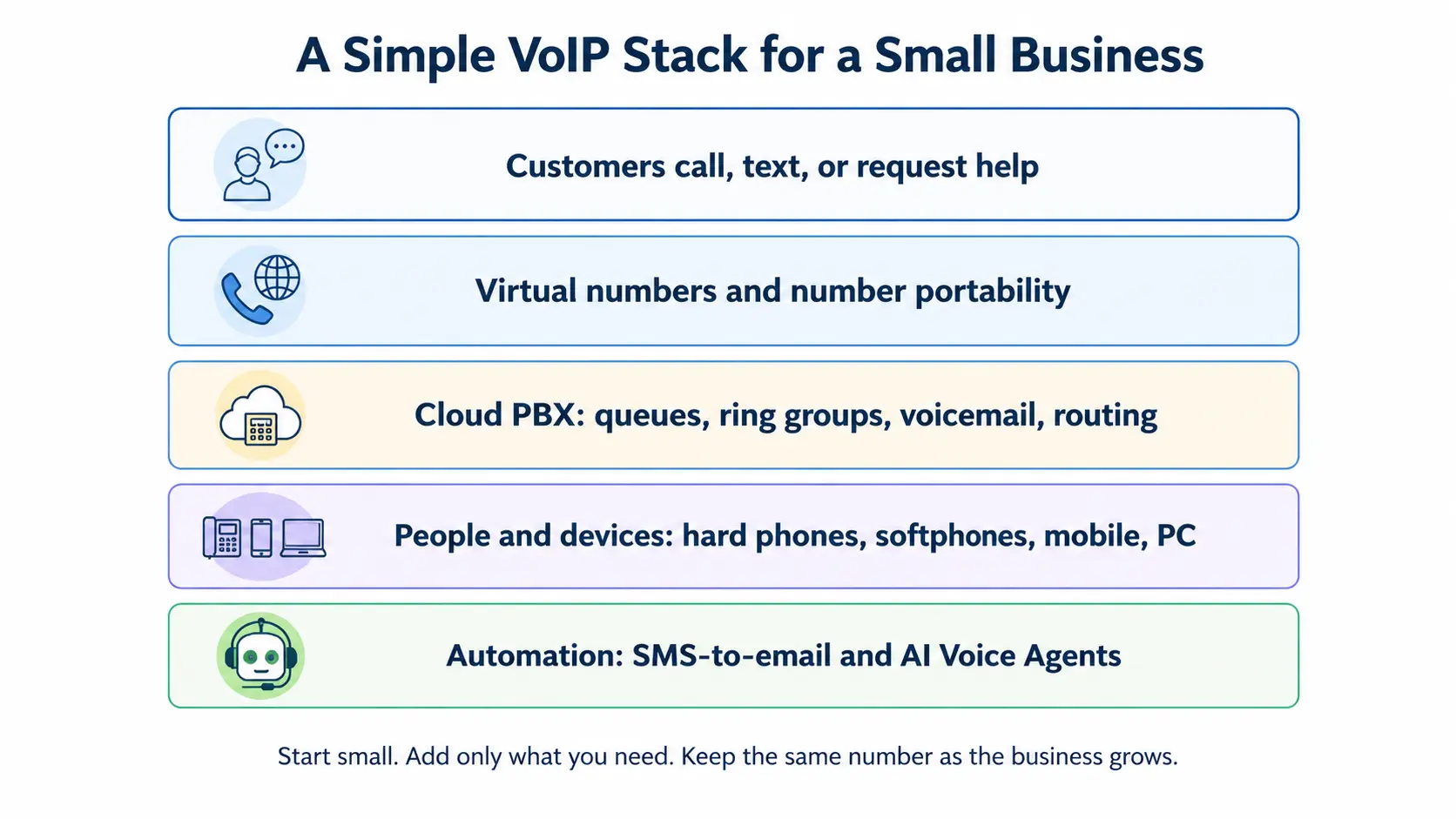
Call architecture is a fancy phrase for how calls move through your business. It does not need to be complicated. Most small businesses can understand it with a few basic building blocks.
The fourth block is backup. What happens if the first person is busy? What happens if the internet is down in one office? What happens if a worker is on another call? Good call routing gives the call another path.
For example, a small HVAC company may route calls like this: during business hours, calls ring the office receptionist and the dispatch phone. If both are busy, callers enter a queue. If the call is after hours, an AI Voice Agent answers, collects the customer’s name, address, problem, and urgency, and then sends the information to the team. If it is an emergency, the call can be routed to the on-call technician.
A medical aesthetics clinic may route calls to reception during the day, to voicemail at lunch, and to an AI Voice Agent after hours for appointment requests and common questions. A bookkeeping firm may send calls to a ring group during tax season and to voicemail-to-email after hours. A small import business may use virtual numbers in multiple countries and route them to one central team.
Ring groups: several phones ring at once
A ring group is a simple and useful feature. When a customer calls, the system rings several phones or users. The first person who answers gets the call.
This is helpful when a small business has more than one person who can help. A repair company may ring the owner, dispatcher, and assistant. A small office may ring reception and a backup person. A retail shop may ring the counter phone and the manager’s mobile app.
Call queues: keep callers organized when the team is busy
A call queue is used when more calls arrive than people can answer at the same time. Instead of getting a busy signal or going straight to voicemail, callers wait in line. The system can play music, announcements, estimated wait messages, or instructions. When a team member becomes available, the next call is delivered.
Queues are useful for appointment booking, support lines, dispatch, sales calls, and seasonal rushes. A queue helps the business sound organized even when it is busy.
SMS-to-email: simple messages where you already look
SMS-to-email means supported incoming text messages are delivered to an email inbox. This can be useful for businesses that receive appointment confirmations, customer messages, account alerts, or verification codes tied to a business number.
For the small business owner, the value is simplicity. You do not need to watch another device all day. A text can arrive in email where it can be seen, searched, forwarded, documented, or handled by the right person.
There are practical limits. Not every service accepts every number type for verification. Some platforms block VoIP numbers for SMS or two-factor authentication. Stronger security methods such as authenticator apps, passkeys, or hardware keys should be used where available. Still, SMS-to-email remains a valuable tool when supported because many real-world systems still rely on text messages.
AI Voice Agents: the next step beyond voicemail and old IVR menus
An AI Voice Agent is a software-based voice assistant that can answer phone calls using natural language. It is different from an old IVR menu that says, “Press 1 for sales, press 2 for support.” A well-designed AI Voice Agent can greet the caller, ask questions, collect information, answer common questions, book appointments, route calls, or create a summary for the business.
For a small business, AI Voice Agents are not about replacing every human conversation. They are about handling the moments when humans are not available or when the same questions are being asked again and again.
A clinic may use an AI Voice Agent to answer basic office-hour questions, collect appointment requests, and route urgent calls appropriately. A real estate office may use it to capture buyer or seller inquiries after hours. A logistics business may use it to collect shipment details. A professional services firm may use it for intake before a consultation.
The best AI Voice Agent is built around the actual workflow of the business. It should know what information to collect, what it can answer, when to transfer, and when to escalate. It should also be transparent and professional. Customers should feel helped, not trapped.
Saving on outbound calls and making inbound costs predictable
Outbound calls are the calls your business makes. This may include calling customers, suppliers, employees, drivers, patients, tenants, leads, vendors, or international contacts.
Small businesses often underestimate outbound calling costs until the bill arrives. Per-minute rates, international rates, mobile destinations, and billing increments can add up. Billing increments matter because some providers round calls up to a full minute. If a call lasts six seconds but is billed as sixty seconds, the business pays for time it did not use.
Flat-rate inbound pricing means the business pays a monthly amount for the virtual number rather than paying a per-minute fee for every incoming call. For small businesses, this is attractive because it makes costs easier to plan. If your marketing works and more people call, you do not want to be punished with unpredictable inbound per-minute charges.
Predictable inbound pricing also helps marketing. A business can test a new city number, campaign number, or service-area number and understand the monthly cost in advance. That makes it easier to measure whether a number is producing calls, leads, and sales.
A profitable business model: communication that pays for itself
A phone system should not be judged only as an expense. For many small businesses, better call handling can pay for itself by saving missed jobs, improving response time, and making the business look more professional.
Consider a tradesperson who misses three calls in one week because the phone rings while they are on a ladder, driving, or speaking with another customer. If even one of those calls would have become a paid job, the cost of missed communication may be far higher than the cost of a VoIP number, softphone, queue, or AI after-hours intake.
Consider a business that spends money on ads. Every click, sign, flyer, Google listing, or referral is meant to make the phone ring. If calls are missed or mishandled, marketing dollars are wasted. A good VoIP setup protects that investment.
This is why VoIP can be profitable. It helps the business capture more of the demand it already creates. It also helps small teams act bigger without pretending to be something they are not.
Practical examples for different types of small businesses
One main local number, mobile softphone for the owner, desk phone for the office, and an AI Voice Agent after hours.
A front desk hard phone, manager softphones, voicemail-to-email, and AI support for after-hours appointment requests.
Virtual numbers in two countries answered from a laptop or mobile phone while keeping a professional market presence.
SMS-to-email for supported alerts, a customer support number, a queue during promotions, and AI intake for common questions.
Ring groups, local market numbers, and softphones for remote employees using one consistent business identity.
Virtual numbers in multiple countries routed to one central team with clear business-hour and after-hour rules.
Ease of setup: start with one number and grow
Many small business owners avoid phone upgrades because they fear complexity. They imagine servers, wiring, expensive hardware, and technical jargon. Modern VoIP does not need to start that way.
A simple setup can begin with one virtual number and one or two users. Calls can ring a mobile softphone and a desk phone. Voicemail can go to email. After-hours calls can go to a message or AI Voice Agent. As the business grows, the setup can add more users, more numbers, more routing, more departments, and more devices.
A small business does not need to build the final version on day one. The best approach is to map the current call flow and fix the biggest pain first.
- Write down the phone numbers your business uses today.
- Identify which numbers are printed publicly or used by existing customers.
- Decide which numbers should be ported and which new virtual numbers may help.
- List who needs to answer calls, and whether they need a hard phone, softphone, or both.
- Map business-hours, lunch, after-hours, weekend, and holiday call routing.
- Decide whether you need a ring group, call queue, voicemail-to-email, SMS-to-email, or AI Voice Agent.
- Start with a clean basic setup, then add features as the business grows.
What to look for in a VoIP provider
A small business should look for a VoIP provider that explains services clearly and supports growth. Price matters, but price is not the only issue. Reliability, support, number coverage, porting help, call quality, security, and practical features matter too.
Look for virtual numbers in the countries and cities you need. Look for predictable inbound pricing. Look for clear outbound rates and sensible billing increments. Look for softphone support, hard phone support, call queues, ring groups, voicemail-to-email, SMS-to-email, SIP trunking if needed, and AI Voice Agent options if your business receives repetitive or after-hours calls.
Also look for support. Small businesses do not always have an IT department. They need a provider that can explain choices in plain language and help design a setup that fits the business.
Security should not be ignored. Business phone accounts should use strong passwords, secure device settings, and careful access control. A VoIP system should be treated as part of the business infrastructure, not as a throwaway app.
Summary: VoIP gives small businesses more control over the calls that matter
VoIP is not just a cheaper phone line. It is a more flexible way to manage business communication. It lets a small business use virtual numbers, keep important existing numbers through local number portability, answer calls on hard phones or softphones, route calls to the right people, receive supported SMS by email, reduce outbound calling costs, and build a smarter call flow.
For tradespeople and small business owners, the real value is practical. Customers can reach the business more easily. Staff can answer from the office, the road, home, or a computer. Inbound costs can be predictable with flat-rate virtual numbers. Outbound calls can be more affordable. Missed calls can be reduced through ring groups, queues, voicemail-to-email, and AI Voice Agents.
A small business does not need to sound small. It only needs to sound organized, reachable, and professional. VoIP products make that possible without forcing the owner to become a telecom engineer.
The best phone system is the one that supports how the business actually works. For many small businesses, that means one trusted number, smart routing, simple devices, predictable costs, and a clear path to grow.
Ready to make your business phone system easier?
CallnFax can help you plan a practical VoIP setup using virtual numbers, softphones, hard phones, call routing, SMS-to-email, SIP trunking, and AI Voice Agents.
Back to top ↑